Digital chore chart for siblings on one family tablet
One tablet, several kids: a digital chore chart that shows who still has chores left, keeps each child's list apart and locks the parent side.
A digital chore chart on a shared tablet works when three things are true: each child sees their own list, everyone can see at a glance who still has chores left, and the grown-up settings stay out of reach. If you'd rather not give a seven-year-old a phone just to check off chores, a tablet on the kitchen counter does the job, as long as it's set up for more than one child.
Where a shared tablet usually goes wrong
A paper chart on the fridge is shared by design. Everyone sees everything. Many chore apps assume one child per phone, so putting several kids on one tablet tends to cause the same three problems:
- The wrong profile. A younger sibling picks up the tablet and taps "done" on their sister's list. Now the credit goes to the wrong child.
- Little fingers in the parent settings. If a grown-up used the tablet last, chore values and rewards are one tap away.
- "I was going to do that!" A chore both kids can do turns into a race, or into nobody doing it.
Siblings sharing one tablet covers the habits that help. The app can do a fair share of the work too.
It starts on "Who's doing chores?"
When the tablet holds two or more kid profiles and you've handed it over, Kroni starts on a board that asks Who's doing chores? Each child has a tile with their avatar, their name and how many chores they have left today, or All done once they're finished. Your child taps their own name and lands on their own list. The board needs two or more kids, so it comes with Kroni Family.
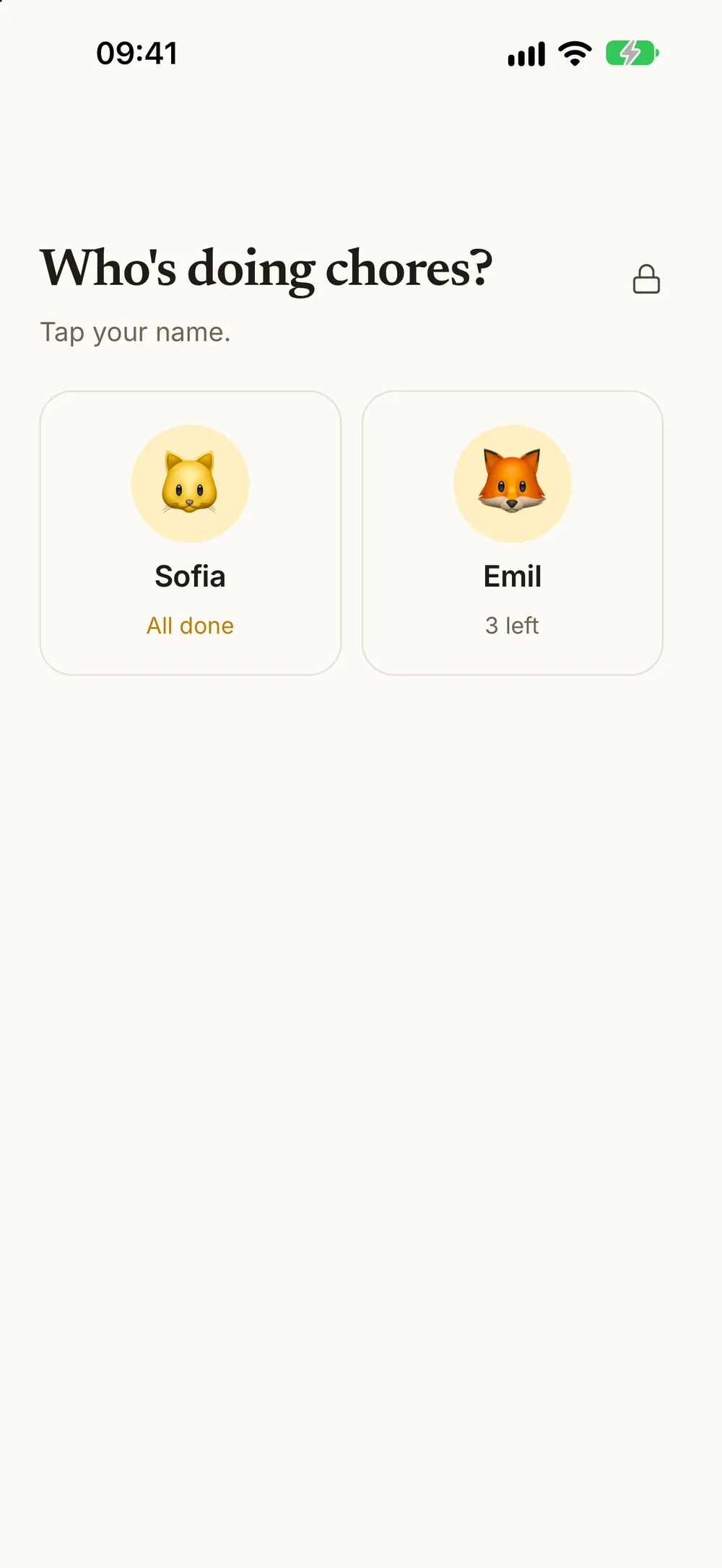
When they're done, Back to everyone takes the tablet back to the board, ready for the next child. Picking your own name is a simple check against wrong-profile mistakes, and it takes a second. The board also shows every child on the tablet at once. A child who sees that their brother is already done tends to get moving without being asked.
Each child keeps their own list and balance
Behind the board, every child has their own Today: today's chores, their balance and anything waiting for a grown-up. They tap the circle when a chore is done. What one child earns never lands on a sibling's balance, and each child has their own savings goals.
For kids who are still learning to read, focus mode can read a chore and its steps aloud in the device's own voice. That helps a six-year-old use the tablet without calling for help every time.
The parent side stays locked
When you switch to a child's profile, the parent side locks. To get back, sign in with your password, or turn on Face ID or fingerprint unlock. One honest caveat: anyone whose face or fingerprint is saved on the tablet can use that unlock too. On a family tablet where a child has added their own fingerprint, stick to the password.
You don't have to approve on the tablet at all. Approve from your own phone, wherever you are. When a child has handed in several chores, approve all of them with one tap. If a chore needs another go, send it back. If your child did a chore but forgot to tap it, record it for yesterday or the day before.
Shared chores without the arguing
Siblings who share a device usually share chores too. Kroni has three ways to handle it. All three need two or more kids, so they come with Kroni Family.
First to do it takes it. For a chore given to all kids, turn on First to do it takes it. One child does it each day. The others see the chore under Not today, marked with who took it, so there's nothing to race for after the fact. If you send it back, it opens for everyone again.
Take turns. For chores nobody wants, like taking out the trash, let siblings take turns. You choose who starts, and the app keeps track of whose turn is next.
Hand a day over. If one child has soccer practice, give that day's chore to a sibling. They do it and earn the reward.
More ideas for keeping the peace are in siblings fighting over chores and a two-week chore schedule for three siblings.
Setting up the family tablet
- Install Kroni on the tablet and sign in as a parent.
- Add each child to the tablet from the profile switcher. Every child you add gets their own profile on the device.
- Switch to a child. The parent side locks.
- Put the tablet where the paper chart used to hang. The kitchen counter or the hallway works better than a bedroom.
- Hand it over. The next time Kroni starts, it opens on the board. If it opens on a sibling's list instead, tap Back to everyone.
Later, when a child gets a phone of their own, connect it with a code, a QR code or a link. See a chore app without a child's phone for other ways to share devices, and connecting your child's own phone for when the time comes.
Paper chart or tablet?
A paper chart is fine for one child and a handful of chores. If that's you, make and print a free chore chart. A tablet earns its place when there are two or more kids, chores that rotate, and money or rewards to keep track of. It remembers whose turn it was, who took the shared chore and what each child has earned, so you don't have to.
What it costs
Kroni is free to download for iPhone, iPad and Android, and the free version has no time limit. It covers one child and five active chores. The board, First to do it takes it and taking turns need two or more children, so they come with Kroni Family, which unlocks unlimited kids and chores at one price for the whole family. New subscribers get a 7-day free trial of Kroni Family.
Frequently asked questions
- Do my kids need their own phone or email address?
- No. Each child gets a profile in your family, and the profiles live on the shared tablet. Your child needs no email address or account of their own. When a child is ready for their own phone, you can connect it with a code, a QR code or a link.
- How do the kids switch between profiles?
- When the tablet holds two or more kid profiles and you've handed it over, Kroni starts on a board that asks Who's doing chores? Each child taps their own name. When they're done, Back to everyone takes the tablet back to the board for the next child.
- Can a child get into the parent side?
- Switching to a child's profile locks the parent side. You get back in with your password, or with Face ID or your fingerprint if you turn that on. Anyone whose face or fingerprint is saved on the tablet can use that unlock too, so think about whose fingerprints are on a shared device.
- How do we stop siblings fighting over a shared chore?
- Turn on First to do it takes it for a chore given to all kids. One child takes it each day, and the others see who took it. If you send it back, it opens for everyone again. First to do it takes it needs two or more kids, so it comes with Kroni Family.
- Does this work with one child on the free version?
- The board needs two or more kid profiles on the device, so it comes with Kroni Family. The free version covers one child, and with one child the tablet opens straight to that child's list.